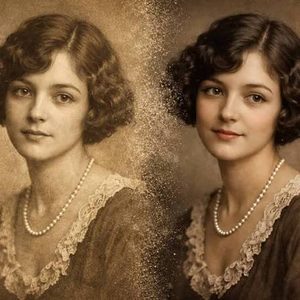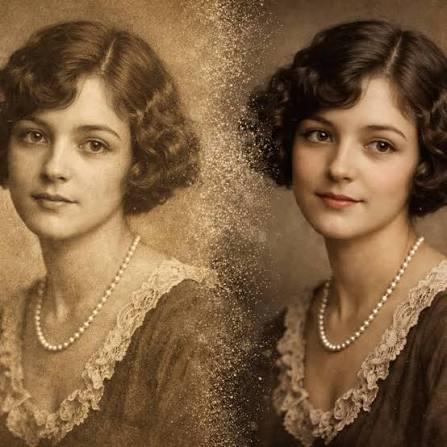
Old photographs capture precious moments, but they cannot show the movement, expressions, or energy behind them. Today, AI-powered animation tools offer a creative way to turn these still images into short, moving memories. Whether you want to see a grandparent smile, add gentle movement to a childhood portrait, or create a family history video, learning how to animate a photo can make old pictures feel more engaging. With the right image, simple tools, and a thoughtful approach, you can bring treasured memories to life without needing professional editing skills.
What Does It Mean to Bring an Old Photo to Life?
Bringing an old photograph to life means adding digital movement to an image that was originally still. Modern animation tools use artificial intelligence (AI) to estimate how faces, backgrounds, or other objects might move. For example, a portrait can appear to blink, smile, or turn slightly toward the camera. A family photograph might gain a gentle zoom effect that makes the scene feel more dynamic.
Photo animation is the process of creating the appearance of movement in a still image. Some methods use simple camera effects, while others rely on AI models to generate new frames between movements. These extra frames create a short video that looks more natural than a sequence of still pictures.
However, animation does not reveal what actually happened when someone took the photograph. AI creates an interpretation based on visual patterns. The result may feel realistic, but it remains a creative reconstruction rather than a historical recording.
Key takeaway: Photo animation turns still pictures into short moving clips using AI or editing effects. The movement is generated, not recovered from the original moment.
Why Are Animated Old Photos Becoming Popular?
Old photographs hold strong emotional value because they connect people with their personal history. A faded portrait of a grandparent, for instance, can remind someone of stories, family gatherings, or childhood experiences. When an animation adds a small smile or gentle head movement, the image may feel more immediate and personal.
Another reason for the growing interest is accessibility. People no longer need advanced video editing knowledge to experiment with basic photo animation. Many modern applications offer guided workflows where users upload an image, select a motion style, and create a short clip. This makes the process approachable for families, students, and casual content creators.
Animated photographs also fit naturally into digital storytelling. People can combine images with narration, dates, captions, and music to build family history videos, anniversary tributes, or digital scrapbooks. These projects can help younger generations connect with relatives and family experiences they never witnessed themselves.
Key takeaway: Animated photographs offer a creative way to revisit memories, share family history, and make personal stories more engaging.
How Can You Animate an Old Photo Step by Step?
You do not need expensive equipment or complex software to start. The most important parts of the process are selecting a suitable image, preparing it carefully, and choosing animation settings that match the photograph.
Step 1: Choose a Clear and Meaningful Photograph
Start with a photograph that shows the main subject clearly. Portraits with visible eyes, natural facial expressions, and limited background clutter often work well for facial animation. A person looking toward the camera may give an AI tool more useful visual information than someone whose face is hidden or heavily blurred.
Image quality matters, but the photograph does not have to be perfect. You can sometimes improve a slightly faded or scratched picture before animation. Avoid heavily damaged images where important facial details are missing because the software may generate inaccurate features.
Step 2: Scan and Restore the Original Image
If your photograph exists only as a printed copy, scan it before making changes. A flatbed scanner set to approximately 300 to 600 dots per inch (DPI) is a useful starting point for many printed photographs. A smartphone scanning app can also work when you have good lighting and keep the camera steady.
Next, make basic improvements to the digital copy. Adjust the brightness, increase contrast slightly, and remove visible dust or scratches when possible. Avoid excessive sharpening or skin smoothing because these changes can erase details that make the person recognizable.
Step 3: Select an Appropriate Animation Tool
Different tools provide different kinds of animation. Some focus on facial expressions, while others can add movement to entire scenes. Before choosing one, consider the result you want to create.
For example, a facial animation tool may suit a close-up portrait of a grandparent. A broader image-to-video tool may work better for a photograph showing a family standing outside a house. Compare editing controls, upload privacy policies, output quality, and download options before making a choice.
Step 4: Add Natural Movement
Once you upload your image, select the motion you want. If you want to animate a photo of a family member, begin with small movements such as blinking, a gentle smile, or a slight head turn.
Subtle effects often suit old portraits better than dramatic facial expressions. Large movements can distort facial features or make the animation appear unnatural. If the application supports text instructions, use a clear prompt such as:
“Create a gentle, natural smile with subtle blinking and a slight head movement. Keep the person’s facial features consistent and the background stable.”
Generate a preview and check whether the movement looks believable.
Step 5: Review, Save, and Share
Watch the final animation carefully before exporting it. Pay attention to the eyes, mouth, hands, and background because these areas can reveal visual errors. If something looks strange, reduce the movement or try a different version.
Save the completed video in a common format such as MP4, and keep the original photograph unchanged. When sharing the clip, consider adding a short caption explaining that AI helped create the movement.
Key takeaway: Choose a clear photograph, create a clean digital copy, select suitable animation software, use subtle motion, and review the result before sharing.
Which Animation Techniques Work Best for Old Photographs?
Not every photograph needs the same animation style. The right technique depends on the subject, image condition, and story you want to tell. Understanding a few basic methods can help you avoid unrealistic results.
Facial animation works well with individual portraits. It creates small changes in facial expression, eye movement, or head position. For example, a formal black-and-white photograph might become a short clip in which the subject gently smiles. This can create an emotional effect without changing the overall composition.
The parallax effect creates an illusion of depth by moving foreground and background layers at different speeds. It is useful for old street scenes, wedding photographs, and family group pictures. A slow zoom or pan is another practical option, especially when the image contains several people or detailed surroundings.
More advanced image-to-video tools can generate environmental movement, such as swaying trees, shifting clouds, or moving clothing. However, these tools may also invent details that were never visible in the source image. For historical photographs, gentle motion usually provides a better balance between creativity and authenticity.
Key takeaway: Use facial animation for portraits, parallax for scenes with depth, and slow camera movement for group photographs or delicate historical images.
How Can You Make Animated Photos Look More Realistic?
Realistic animation starts with restraint. When software creates too much movement, the subject may look different from the person in the original photograph. A small expression or slow camera movement can feel more convincing because it stays closer to the details the image actually contains.
Lighting and visual consistency also matter. A photograph with soft lighting should not suddenly gain harsh shadows or dramatic changes in color. When working with black-and-white pictures, consider keeping the original tones rather than adding color automatically. This can help preserve the photograph’s familiar appearance and historical character.
Finally, keep the animation short and focused. A brief clip of a gentle smile may communicate more emotion than a longer video filled with repeated movements. If you want to build a longer story, combine several short animations with captions, narration, and transitions instead of forcing one image to produce continuous motion.
Key takeaway: Small movements, consistent lighting, natural expressions, and short clips help animated photographs look more convincing.
What Mistakes Should You Avoid When Animating Old Photos?
One common mistake is expecting AI to reconstruct a person’s exact movements. The software does not know how someone smiled, blinked, or turned their head in real life. It estimates these actions from the information in the photograph and patterns learned during training.
Another mistake is uploading valuable family photographs without reviewing the service’s privacy terms. Some online tools may store uploaded images or apply different rules to generated content. Check how the platform handles personal data, whether images can be deleted, and whether they may be used to improve AI models. When a photograph features a living person, seek their permission before creating or publicly sharing a realistic animation.
You should also avoid replacing the original photograph with an edited version. Restoration, colorization, and animation can change important visual details. Maintain a separate copy of the original image, especially when working with rare family photographs or historical material.
The Library of Congress preservation resources provide useful background on protecting valuable materials. Applying careful preservation habits to digital files helps ensure that creative edits do not replace authentic records.
Key takeaway: Treat AI animation as a creative interpretation, protect personal privacy, and always preserve an untouched copy of the original photograph.
How Can Animated Photos Help Tell Family Stories?
Animated photographs become more meaningful when they support a real story. Instead of presenting a moving face without context, include the person’s name, the approximate date of the photograph, and a short description of the occasion. These details help viewers understand why the memory matters.
For example, imagine finding a wedding photograph of your grandparents from several decades ago. You could restore the image, add a gentle camera movement, and combine it with a short recording of a relative describing the celebration. The finished video would preserve more than an image. It would connect the photograph with family memories and spoken history.
You can also organize several photographs into a digital timeline. Start with childhood pictures, continue through important milestones, and finish with recent family photographs. This approach blends traditional storytelling with modern digital creativity, a theme that fits the culture and lifestyle interests readers explore through Trendify Magazines.
Key takeaway: Add names, dates, captions, and family stories to animated photographs to create more meaningful digital keepsakes.
Frequently Asked Questions
1. Can you animate an old photo for free?
Yes. Some photo animation applications provide free versions, trials, or limited generations. However, free plans may restrict video length, resolution, downloads, or the number of animations you can create.
Quick answer: Free photo animation options exist, but their features and usage limits vary.
2. Can AI animate blurry or damaged photographs?
AI can sometimes animate blurry or damaged pictures, especially after basic restoration. However, missing facial details may cause distorted expressions or inaccurate movements. Improving image clarity before animation can help.
Quick answer: Damaged photographs may work, but restoring them first often improves the result.
3. How long should an animated photo video be?
A clip of roughly three to eight seconds is a useful starting point for simple portraits. Longer videos may work for more complex scenes, but they can also introduce additional visual errors.
Quick answer: Short animations are often easier to keep natural and visually consistent.
4. Can you animate a photo without editing experience?
Yes. Many AI animation tools use simple upload-and-generate workflows. Beginners can start with an automatic motion preset and make adjustments after reviewing the preview.
Quick answer: Basic photo animation is accessible to beginners, especially with guided AI tools.
5. Is it safe to share AI-animated family photographs online?
It can be, provided you consider privacy, consent, and transparency. Avoid uploading sensitive images to unfamiliar services, ask permission when appropriate, and label AI-generated motion clearly to prevent confusion.
Quick answer: Review privacy settings, respect consent, and identify AI-created animations when sharing them.
Conclusion: Give Old Memories a New Way to Be Seen
Old photographs preserve meaningful moments, and digital animation offers a fresh way to share them. With accessible editing tools, careful image preparation, and subtle movement, you can transform a still picture into a short visual story that feels more immediate and engaging.
The key is to respect the original image while exploring creative possibilities. You do not need dramatic effects or professional editing experience to produce something meaningful. A simple smile, gentle zoom, or thoughtful family narration can make a familiar photograph feel new again.
When you animate a photo, remember that the goal is not to recreate history perfectly. It is to celebrate the people, places, and stories that deserve to be remembered.
Final takeaway: Bringing old photos to life works best when you combine clear images, subtle AI animation, responsible editing, and meaningful storytelling. Preserve the original photograph, keep generated movement realistic, and use the finished video to share memories with care.